Tech Support Websites

  • Subscribe to our RSS feed.
  • Twitter
  • StumbleUpon
  • Reddit
  • Facebook
  • Digg
Showing posts with label WebApps. Show all posts

Thursday, 19 July 2012

HOW TO find what movies two film personalities have in common

Posted on 08:42 by Unknown

1) Use this special Search page on IMDb to find information about common cast/crew between two titles or two people who have worked together

See what movies A R Rahman & Mani Ratnam have worked on

(Source: How do I query IMDb for movies that two actors have in common?)

2) WolframAlpha can find movies two actors were in, if you try a query like this - movies with adam sandler and drew barrymore


Also see:
Does IMDb provide an API?

Read More
Posted in Trivia, WebApps | No comments

Tuesday, 10 July 2012

Websites that track traffic in Indian cities

Posted on 20:09 by Unknown
Although currently not very accurate, there are websites that track traffic in Indian cities -

* (7/Sept/2012 Update) Google Maps Live Traffic - Google Maps has started offering live traffic information for major roads in six large Indian cities and their surrounding suburbs: Bengaluru, Mumbai, New Delhi, Chennai, Pune and Hyderabad.

The Google Maps feature of showing “typical” traffic conditions for a particular day and time, based on historical data is interesting.

The live traffic info does not currently appear to be accurate. I've been following their map along the route I take & though Google Maps shows there is congestion (represented in red) the road has been unusually traffic free.

In comparison, MapMyIndia does a better job -


* Traffic.MapMyIndia.com - Currently shows traffic conditions in Delhi, Mumbai & Bangalore

MapMyIndia uses information gathered from vehicle tracking systems that it has deployed with call centres as an enterprise solution, as well as GPS systems for taxis that are a primary source of information. These are all connected GPS systems. MapMyIndia has benchmarked average speeds on roads, which they compare with realtime data for traffic information. 

* BTIS.in - Currently tracks traffic in the following cities -
  • Ahmedabad
  • Bangalore
  • Chennai
  • Delhi
  • Hyderabad
  • Indore
  • Kolkata
  • Mumbai
  • Mysore
  • Pune
  • Vadodara
* SabkaTraffic - Shows traffic info in the following cities and also provides updates over Twitter -
  • Ahmedabad - @SabkaTrafficAMD
  • Bengaluru - @SabkaTrafficBLR
  • Chandigarh - @SabkaTrafficIXC
  • Chennai - @SabkaTrafficMAA
  • Delhi - @SabkaTrafficDEL
  • Hyderabad - @SabkaTrafficHYD
  • Indore - @SabkaTrafficIDR
  • Jaipur - @SabkaTrafficJAI
  • Kanpur - @SabkaTrafficKNU
  • Kolkata - @SabkaTrafficCCU
  • Lucknow - @SabkaTrafficLKO
  • Mumbai - @SabkaTrafficMUM
  • Nagpur - @SabkaTrafficNAG
  • Pune - @SabkaTrafficPNQ
  • Surat - @SabkaTrafficSTV
  • Global Incidents - @SabkaTraffic
Also see:

  • Online, SMS-based services to get distance, approximate autorickshaw fare and other location-related info
  • How Google Builds Its Maps—and What It Means for the Future of Everything


Read More
Posted in India, WebApps | No comments

Thursday, 5 July 2012

Web Apps Watch - 2

Posted on 21:30 by Unknown
* Hotmail single user code - Many services now use your phone number to send passcodes through text messages for additional authentication. Hotmail provides a disposable single-use code when you're browsing from a public internet connection. 

Wonder if this feature will come to Live Connect  (the new name for Microsoft's single sign-on Passport Authentication technique)? 

* Google Search miscalculates - If a Google Search result points to a question on a discussion Forum, it may display the number of answers.

The way it tries to guess may be faulty. The StackOverflow question link referenced in the result (shown in image above) has just one answer & four comments but Google counts it as 5 answers

* WebRTC can enable video chat without browser plugins -  Google's open sourced technology for real time communications, WebRTC, MAY be used on Google Hangout and Skype on the browser in the future. WebRTC will allow developers to create voice and video chat applications via simple HTML and JavaScript APIs.

* Google on a killing spree - Google will be closing iGoogle, Google Video, Google Talk Chatback, Google Mini, and the Symbian Search App. Last year it announced it plans to shutdown Google Translate, Transliterate & ten other APIs and disappointed a lot of developers. Will developers trust when they release their future APIs?

* Lesson to learn from LinkedIn's security breach - "LinkedIn was using an outdated form of cryptography to secure its users' private information. The company should have known better than to guard its lists with just SHA-1, experts say.

The problem with SHA-1 is that it translates the same text the same way each time. So if your password is "password" and your friend's password is also "password," they will be hashed exactly the same way. That makes reversing the process to uncover the original password
significantly easier.

That's why security experts recommend that companies with giant lists of private data like LinkedIn add another security layer called "salt."

Salt randomly adds another piece of information to the password. It could be a user name, first name, or even a random number -- the point is that it changes the underlying text enough to make it almost
impossible to decode."

* Placehold.it - an image placeholder service that generates a blank image with desired dimensions. Useful when you are designing a page but you don't have real images yet.

Also see:
Web Apps Watch - 1

Read More
Posted in WebApps | No comments

Tuesday, 29 May 2012

HOW TO visualize approximate radial distance from a fixed point on a map

Posted on 21:36 by Unknown

The Twitter Location Search app utilizes Google Maps to show approximate radial distance from a specified point on a map


If you are an API developer, this tool can be useful to visualize approximate radial distance while dealing with location-specific queries.

The Twitter Search API supports a parameter called geocode that returns tweets by users located within a given radius of the given latitude/longitude for a given search term.

The parameter value is specified by "latitude,longitude,radius", where radius units must be specified as either "mi" (miles) or "km" (kilometers).

The maximum limit for the radius is not specified in the API docs but the Advanced Search feature on Twitter has 1000 as the upper limit.

Read More
Posted in APIs, WebApps | No comments

Sunday, 8 April 2012

Google Mobilizer Bookmarklet - view just text of web pages

Posted on 00:10 by Unknown
You can use Google Mobilizer application, when you need a mobile-friendly version of webpage. If you are on a low-bandwith Internet connection, Google Mobilizer can be used on a PC or laptop to view just the text (and optionally images).

When I'm on Twitter, I don't have a good feeling about clicking URL shortened links as they don't reveal the domain name and can lead you to spam. Ocassionally, I'm directed to web pages that have more ads than content. I also learnt the creepy fact that any site can find out if you are logged into social web sites.

http://datatransparency.wsj.com/

Considering these privacy, security & readability issues I faced, I wished there was a way to open all links in a web page with Mobilizer so that I can view a minimalist, text-only version of a web page. I wrote the Google Mobilizer Bookmarklet to scratch this itch.

The "prettified" code looks like this -
javascript:(function() {
    a = document.getElementsByTagName('a');
    for (i = 0; i < a.length; i++) {
        a[i].href = 'http://www.google.com/gwt/x?noimg=1&btnGo=Go&source=wax&ie=UTF-8&oe=UTF-8&u=' + encodeURIComponent(a[i].href);
        a[i].style.backgroundColor = '#f0f0f0';
    }
}())

To use the bookmarklet, drag & drop the following link to you Bookmarklet/Favorites bar - Mobilizer

Once you're on a page that has a lot of links (like Twitter), click on the Mobilizer bookmarklet & it will then set a light grey background color to all hyperlinks on that page & prepend the Google Mobilizer URL to them.

As the Google Mobilizer application works by taking a querystring as an input, it can be adapted to work like a search provider in Chrome & Opera, to simplify its use.  The string to use for configuring it is -
http://www.google.com/gwt/x?noimg=1&btnGo=Go&source=wax&ie=UTF-8&oe=UTF-8&u=%s

If you assign a letter like M to this app, you can type M in the Chrome address bar/omnibox & then the type the URL you would like to see via Google Mobilizer.

Related:
The Joy of Bookmarklets
View clutter-free web pages with TidyRead, Safari Reader
HOW TO block images/image ads originating from a specific domain in Firefox 4 & above
HOW TO block IFRAME based ads
Read More
Posted in Bookmarklet, Javascript, WebApps | No comments

Wednesday, 4 April 2012

Low bandwidth? Try mobile version of popular websites on PC/laptop

Posted on 09:06 by Unknown
There may be times when you have to make do with a low bandwidth internet connection. Don't despair for that may be a good time to discover how fast & clutter-free the mobile version of popular sites are on your PC/laptop.

Here is a list of such mobile sites:

Popular:
  • YouTube
  • Wikipedia
  • Yahoo
  • Slideshare
Social media:
  • Twitter
  • Facebook
Search Engines:
  • Bing  (~4.3KB)
  • WolframAlpha
Utility:
  • GMail (login page 1.3KB, Inbox 4.2KB)
  • Google Reader  (~8.3KB)
  • Google Mobilizer - converts websites to mobile-friendly format
  • IRCTC
Newspapers:
  • The New York Times
  • Economic Times
  • Times of India (city editions)
  • The Hindu Business Line
  • The Hindu
Magazines:

  • The Atlantic


Others:
  • ESPNcricinfo


(work in progress..)

Related:
HOW TO access web pages faster on a slow Internet connection
HOW TO extract subtitles from a YouTube video
Google Mobilizer Bookmarklet - view just text of web pages

Read More
Posted in Mobile, WebApps | No comments

Saturday, 24 March 2012

Web Apps Watch - 1

Posted on 20:36 by Unknown
As a web developer, I like to track interesting features, UI patterns used on popular Web Apps & also related trivia.

Here are a few things I noticed this week -

* Hotmail can help you organize emails from senders of bulk mail:

* I previewed some content from an ASP.NET book on Google Books and noticed their localization for India & acknowledgement of  popularity of Indian online stores - links to Indian online stores from where I can purchase that book:

* ChromeCacheView reveals interesting URL of where YouTube videos are coming from when I browse them over Airtel Broadband:

* Finding out what browser a visitor to your website is using, their IP address, screen resolution and if cookies are enabled in their browser, is old hat. There are scripts for just any website to find out if a visitor is logged into Gmail, Twitter & Facebook as this Wall Street Journal page shows:


* There have been times when I've wanted to add context notes to an email I've received so that I can reference it later. Messages in Gmail can be copied to Google Docs & you can add your notes there using a Labs feature.

* Twitter now provides local trends for 6 cities in India -Ahmadabad, Chennai, Hyderabad, Bangalore, Delhi, and Mumbai.

Read More
Posted in India, WebApps | No comments

Monday, 20 February 2012

Free online services to find what a site is running on

Posted on 09:56 by Unknown
  • Netcraft is one of the oldest sites devoted to tracking technology on the Internet. Their service provides a site report that can tell you what web-server a site is running on, host info, uptime etc and also identify related subdomains.
  • BuiltWith lists technologies used by a specified site. As they profile thousands of sites, BuiltWith Trends provides consolidated information about the most popular technologies used on the web.
  • Snoopy is a bookmarklet for snooping on web pages. Snoopy can 'sniff' out of the page, such as the   doctype, what JS libraries are used in the page, what analytics, what font embedding technique is used, etc. I found it interesting that it also shows the generated source which can be useful to web developers for debugging.
     
Read More
Posted in WebApps | No comments

Saturday, 11 February 2012

Online IDEs for C# - frill free Visual Studio alternatives

Posted on 22:41 by Unknown
Got a quick C# snippet to try out but don't want to use Visual Studio or don't have the resources on your computer right-away? There are some great desktop alternatives to VS to run snippets but did you know, there are also online IDEs for running .NET code:
  • CodeRun
  • Compilr
  • ideone
  • MSDN Virtual Labs
This type of web applications that allow their users to upload snippets of text, usually samples of source code, for public viewing, are called Pastebins. There are plenty of Pastebins now, but the above list lets you run C# programs.

Also see:
Collaborative JavaScript debugging tools - jsFiddle & JS Bin
Read More
Posted in C#, Tools, WebApps | No comments

Thursday, 15 December 2011

Fastest dictionary on the web - thefreedictionary.com

Posted on 08:36 by Unknown
As per the most voted answer on Web Applications StackExchange forum, thefreedictionary.com with the print layout is the fastest and their content is pretty comprehensive too.

WordWeb is my favorite desktop dictionary tool & now I also have thefreedictionary.com configured as my search engine for words within Chrome.

The URL looks simple - http://thefreedictionary.com/p/Word & this makes it super easy to add the site as a search provider in Chrome & Opera. This generic article how you can add thefreedictionary.com as a search engine option.

I assigned the letter "d" to represent thefreedictionary.com as a shorcut for dictionary. So now, whenever I need to search for the meaning of a word I type "d" in the Chrome address bar, hit space followed by word & bingo...a detailed page pertaining to that word appears in a flash.

Related:
HOW TO Google specifically for discussions/answers on only online forums instead of articles
Free Programmable & Searchable Dictionaries
Read More
Posted in Chrome, WebApps | No comments

Friday, 9 December 2011

Get over pesky layout/design changes, use keyboard shorcuts on Twitter, Google products

Posted on 10:34 by Unknown

When popular websites change their layout & design, it takes time for users to get accustomed to it. If you don't like frills and rather like features that get your work done faster, explore keyboard shorcuts that web apps like Twitter, Gmail, Google Reader, Google Docs offer. Just hit the question mark (?) key while you are logged into one of those sites and you will see a popup with a list of all supported hotkeys. While the keyboard shortcut Help popup has been in GMail & Google Reader since a couple of years now, I came to know about the Twitter hotkeys today from Scott Hanselman's blog.

I found the choice of letters used by Twitter hotkeys more intuitive than what Google has (how easy is it to correlate Sneak Peak with the letter "h"?)

... so I identified for myself a list of shortcuts that are easily memorable from the much larger list:

  • g then i : Go to Inbox
  • g then s : Go to Starred conversations
  • g then t : Go to Sent messages
  • g then d : Go to Drafts
  • g then a : Go to All mail
  • g then c : Go to Contacts
  • g then k : Go to Tasks
  • g then l : Go to Label
  • u : Back to threadlist
  • k / j : Newer/older conversation
  • o or or <Enter> : Open conversation; collapse/expand conversation
  • c : Compose
  • / : Search
  • ? : Open shortcut help
  • ! : Report as spam
  • # : Move to bin
  • r : Reply
  • <Shift> + r : Reply in a new window
  • a : Reply all
  • <Shift> + a : Reply all in a new window
  • f : Forward
  • <Shift> + f : Forward in a new window
  • z : Undo last action
  • g then w : Create a blank document
  • h : Sneak peek
  • <Shift> + t : Add conversation to Tasks
  • <Tab> then <Enter> : Send mail
  • . : Open more actions menu
  • <Ctrl> + s : Save draft

The ? hotkey Help shortcut popup is an interesting UI Pattern that other web apps should start using as well.

Just as browsers have almost standardized on keyboard shortcuts, it will be good for users if web sites standardize helpful features like the keyboard shortcuts Help popup and maintain similar mappings.

Here's a list of sites that support keyboard shortcuts (those supporting the ? hotkey Help shortcut popup are shown in bold):

  • Twitter
  • Gmail
  • Google Reader
  • Google Docs 
  • Yahoo
  • Remember The Milk
  • Hotmail


Read More
Posted in GMail, Google Reader, Twitter, WebApps | No comments

Monday, 18 July 2011

HTML5 at work

Posted on 20:18 by Unknown
I plan to look out for & compile interesting, practical, real-world examples of HTML5 features that popular websites have started implementing. I hope all the browser manufacturers quickly agree on a common minimum set of HTML5 features & get HTML5 rolling.

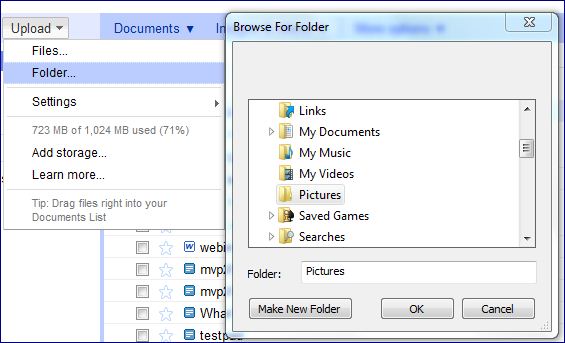
* Google Docs now supports uploading an entire folder.

There is a nice explanation on StackOverflow about how this is achieved  by setting up an attribute "webkitdirectory" on a file input element.

Unfortunately as this attribute is proprietary, this feature doesn't work on all browsers.

* The Windows Live team recently released a faster new version of SkyDrive that incorporates HTML5 features.
"We’re using HTML5 for CSS animations, reflow animations and other features. We’re using local storage for various parts of our caching support. We’ve also worked on making our HTML more standards compliant, so that everything you see works in as many modern browsers as possible."

HTML5 versions of Hotmail & Bing are believed to be on the cards

* 6 of the world's top 10 websites currently use LocalStorage on the mobile while Bing & Google use it on the desktop browser as well. Twitter uses App cache.

(to be continued....)
Read More
Posted in HTML5, WebApps | No comments

Sunday, 17 July 2011

Discover public transport in India with Google Transit

Posted on 04:11 by Unknown
I first tried Google Transit in Seattle in 2008 for help with bus routes and wished it came to India as well. I was happy when it started covering local trains of the Hyderabad Multi Modal Transit System (MMTS) in 2010(it seems to discontinued now) and then wished it worked with bus routes as well. Being a believer in public transport as a way to protect the environment, I was glad to find out that Google Transit provides help with bus routes in Hyderabad, Bangalore, Chennai, Mumbai, Delhi.

It'll be great if they also show the cost & distance involved in different bus routes and bus types (buses in Bangalore & Hyderabad have multiple types of services with varying ticket costs)
Read More
Posted in Google, WebApps | No comments

Wednesday, 9 February 2011

India - Know your elected government representatives

Posted on 09:54 by Unknown
Who says India is a poor country? Did you know 315 of the 545 MPs (Members of Parliament) in the current Lok Sabha or Lower House of Parliament are crorepatis (have assets greater than 10 million Indian rupees)? Out of 543 MPs (Lok Sabha), 153 are facing criminal charges. Fifty-four are facing charges of very serious nature, including murder. Who says having 35 criminal cases filed against an individual can stop that person from becoming a law-maker?


The Association for Democratic Reforms' National Election Watch is a web-based application that has collated details about India's elected government representatives, both at the state & national level, from their own sworn affidavits. It lists details like their constituency, Party, involvement (if any) in criminal cases, education, assets and liabilities. Find out how the representative for your region stacks up against the rest and be better informed while voting at the next election.

This website is the winner of the 2011 NASSCOM Social Innovation Honours in the ICT led Innovation by Multi-stakeholder Partnerships category.

Also see:
BigTech/NASSCOM Foundation offers NGOs software titles at huge discounts
Indian software product start-ups that are making news
Judicial Orders that changed the nation 
When grassroots innovation goes global
Read More
Posted in India, WebApps | No comments

Tuesday, 18 January 2011

Free WebApp Security Testing tools

Posted on 08:56 by Unknown
Performance & Security are non-functional requirements which cannot be taken for granted.

Here's a compilation of Security testing tools for Web apps, drawn from an answer on the Pro WebMasters StackExchange forum & other sources -
  • Netsparker Community Edition - detects SQL Injection, XSS & other vulnerabilities
  • Watcher - Fiddler plugin that works as a passive-analysis tool
  • Microsoft Web Protection Library (WPL)
  • Web Application Configuration Analyzer (WACA) - analyzes server configuration for security best practices related to General Windows, IIS , ASP.NET and SQL Server settings.
  • AntiXSS 4.0 - protects ASP.NET web-based applications from XSS attacks
  • CAT.NET
  • HP Scrawlr - scans for SQL injection vulnerabilities
  • Exploit-Me - suite of Firefox add-ons
  • Websecurify - also available as a Google Chrome Extension
  • Acunetix Free Edition
  • N-Stalker Free Edition
  • Google's Skipfish
  • RatProxy - passive web application security assessment tool
  • Nikto2 - open source web server scanner
  • w3af or Web Application Attack and Audit Framework
  • Arachni
  • Wapiti
  • WebScarab
Also see:
Web Performance Analysis & Optimization tools
Read More
Posted in ASP.NET, Security, Tools, WebApps | No comments

Saturday, 15 January 2011

Comparison of URL Shortener services

Posted on 12:21 by Unknown
SearchEngineLand & NotLong have compared popular URL Shortener services.

Google offers its own URL Shortener service called goo.gl (gl is the country-code top-level domain designated for Gibraltar). It now also has an API.

Pingdom, the uptime & performance monitoring service, has found goo.gl to be one of the fastest and with 100% uptime.

For spam, security or legal reasons, the goo.gl service can disable some short URLs

Read More
Posted in WebApps | No comments

Saturday, 25 December 2010

How Tynt Insight works

Posted on 19:46 by Unknown
If you are looking for tips on a range of useful topics, head to Dummies.com (never mind the name). It is the website for the For Dummies series of plain English reference books. The site features interesting topics from it's books on varied & complex subjects.

If you copy & paste any content from there, it will add a link of the URL from where it was copied, at the end of the pasted content. This is achieved by a 12KB JavaScript utility library called Tynt Insight.

There is a nice explanation on StackOverflow about how Tynt Insight works -
  • the code activates on events like mouseup, mousedown, and copy (in the startListeningForTraces function)
  • if the user selected a range of text, then it:
    • creates the HTML for an attribution link, plus optional CC license URL
    • appends this HTML to the selection, placing it inside a zero-size <div> (to keep it invisible on-screen)
    • reports what was copied back to Tynt's servers
Read More
Posted in Javascript, Tip, WebApps | No comments

Thursday, 23 December 2010

HOW TO make Gmail Labels act like Hotmail Folders

Posted on 08:41 by Unknown
If you apply a Label to an email in Gmail, it will appear under both the Inbox & the Label category chosen. This is unlike in Hotmail where an email can appear only under one Folder category.

To address this issue, Gmail introduced a "Move to" option that will place an email under a single Label or category. This option can help in maintaining a clutter-free, cleaner Gmail Inbox but requires manual intervention. A poster on the StackExchange Web Apps forum wanted to know how he can automatically filter emails on arrival so that they are placed under a single category as in Hotmail.

Here are the steps -
1. Click on the "Create a Filter" link that's next to search box in Gmail

2. As we want the filter to act upon ALL emails that are recieved, set the To: textbox to your own email address & click on the "Next Step" button


3. Choose the first option to Skip the Inbox alongwith "Apply the label:" option to move an incoming email to a specific label/category. This way every mail that you get will be automatically categorized, thereby simulating Hotmail Folders.


If you want to view all your emails uncategorized at any point of time,  click on the "All Mail" option in the left menu
Read More
Posted in GMail, Hotmail, HOWTO, WebApps | No comments

Tuesday, 21 December 2010

Hotmail tip - Move, Delete, Find emails originating from a specific sender with a single click

Posted on 08:36 by Unknown
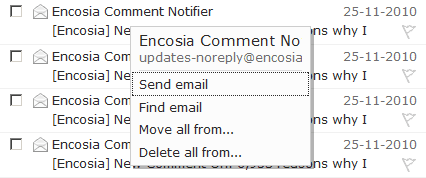
Did you know, a context menu will pop-up after two seconds if you place your mouse on any email within Hotmail


With just one click on the context menu, you can then ...

  • reply to that email without explicitly opening it
  • find all emails which have originated from the same email address as that of the selected email
  • move all emails from the same sender to a specified folder
  • delete all emails which have originated from the same email address at once

This a pretty neat & thoughtful shortcut!


If you right click on that email, it opens up a context menu that will let you perform operations on that email alone


Also see:
Hotmail lets you download attachments as a zip file
The One Click GMail Help Layer UI Pattern
Read More
Posted in Hotmail, Tip, WebApps | No comments

Sunday, 14 November 2010

Prevent identity theft with HTTPS browsing

Posted on 10:24 by Unknown
The grave risk of Internet users unwittingly letting out their private & sometimes confidential details while using unencrypted networks has been brought to focus by at least two startling incidents.

Back in May, Google candidly admitted that its Street View data collection cars inadvertently collected and stored "payload data from unencrypted WiFi networks, but not from networks that were encrypted". More recently a Firefox extension called Firesheep exposed the vulnerability of HTTP browsing in aiding identity spoofing.

Analyzing the Firesheep extension, Jeff Atwood makes the following recommendations to protect yourself -
  • We should be very careful how we browse on unencrypted wireless networks.
  • Get in the habit of accessing your web mail through HTTPS
  • Lobby the websites you use to offer HTTPS browsing.
Gmail enabled default HTTPS access for everyone in January this year. Hotmail lets you turn it on from your Account settings (go to Hotmail Options > Managing your account > Account details & in the Account overview page, choose the "Connect with HTTPS" link under Other options)


Also see: 
Protect your Twitter and Facebook accounts! How to do it…
LinkedIn now supports https currently as an “opt in” feature
Take 2 Minutes to Clean Your Apps Permissions
Read More
Posted in Security, Tip, WebApps | No comments
Older Posts Home
Subscribe to: Posts (Atom)

Popular Posts

  • 10 ways to make laptop battery last longer
    Paraphrased from a Right Choice magazine article with my own opinions: Keep the brightness of the screen as low as possible. If portability ...
  • Manipulate PDF files for free with PDFRider
    PDFRider (currently in version 0.5) is an open source project on Codeplex. This utility provides a GUI for the command-line program  Pdftk ...
  • A new JavaScript Reference to bookmark
    For years, the JavaScript section at W3Schools.com has been a indispensable source of reference for me . It will now not be my only source. ...
  • HOW TO read long text messages on the Samsung Omnia 652
    Samsung Omnia 652 clumps text messages from a single recepient together. Scrolling through a message doesn't reveal the entire message ...
  • Look what Google Goggles visual search can do
    Google Goggles is a visual search application available currently for Android powered phones. It may possibly be available for phones of oth...
  • HOW TO try Windows Azure for free (without any credit card)
    Windows Azure, Microsoft's cloud platform offers .NET developers a great opportunity to extend their skills to this new platform. You do...
  • What is the difference between Browser Mode & Document Mode in IE
    If you're a web developer and your job actively involves building web pages that work the same in all browsers including the last three ...
  • NDepend - a powerful .NET code analysis tool
    Nearly a decade ago, I was amazed when a not-so-technical project manager gave detailed feedback on my C# code in a project I was working on...
  • Pluralsight Introduction to PowerShell Course - Notes
    Summary of the 2hour 40 minute duration Pluralsight   Introduction to PowerShell course, including other interesting material I found - + W...
  • Words that leave Google Instant speechless
    2600 Magazine has compiled a list of objectionable words that Google Instant has blacklisted. Several volunteers have submitted blackliste...

Categories

  • AJAX
  • Android
  • APIs
  • App
  • ASP
  • ASP.NET
  • ASP.NET-MVC
  • Azure
  • Azure SQL Database
  • AzureInPictures
  • Bing
  • Book Review
  • Bookmarklet
  • Browsers
  • C#
  • chart
  • Chrome
  • Cloud
  • CSS
  • CSS3
  • DidYouKnow
  • E-Commerce
  • Excel
  • FB
  • Fiddler
  • Firefox
  • Gadgets
  • GeoLocation
  • GMail
  • Google
  • Google Docs
  • Google Reader
  • Health
  • Hotmail
  • HOWTO
  • HTML
  • HTML/CSS
  • HTML5
  • Humor
  • Hyderabad
  • IE
  • IIS
  • India
  • Internet
  • IT
  • Javascript
  • jQuery
  • JSON
  • JSONP
  • Laptop
  • Learning Resources
  • Lists
  • Map
  • Metrics
  • Microsoft
  • miscellaneous
  • Mobile
  • NAPA
  • Office365
  • Opera
  • PDF
  • Performance
  • Personal
  • PHP
  • PM
  • PowerShell
  • Privacy
  • Programming
  • Rant
  • Safari
  • Science
  • Search Engines
  • SearchEngines
  • Security
  • SEO
  • Sharepoint
  • SharePoint2013
  • Silverlight
  • Software Engineering
  • Solutions
  • SQL Azure
  • SQL Server
  • TFS
  • Tip
  • Tips
  • Tools
  • Tools/Utilities
  • Trivia
  • TWIL
  • Twitter
  • UX
  • VM
  • VS.NET
  • VS2010
  • VS2012
  • WCF
  • WebApps
  • Websites
  • WF
  • Windows Phone
  • Windows7
  • Windows8
  • Word
  • WP7
  • WPF

Blog Archive

  • ▼  2013 (112)
    • ▼  October (16)
      • 10 ways to make laptop battery last longer
      • Learnings in S/W Engineering from the HealthCare.g...
      • TWIL - Week #29
      • MS currently has 21 apps on Google Play, incl. Wor...
      • Review: uCertify PMI PMP v-5 Online PrepKit
      • TWIL - Week #28
      • HOW TO highlight a Province within a Country with ...
      • My first impressions of Nexus 7 tablet
      • Free APIs, online services to generate screenshots...
      • TWIL - Week #27
      • HOW TO prevent mixed content warning in web pages
      • What's common between Kovid Goyal & Antony Lewis?
      • TWIL - Week #26
      • FB & Twitter spam me with similar subject line
      • Book Review: PMP Rapid Review by Sean Whitaker; MS...
      • Windows Azure Mobile Services - Error: Table 'some...
    • ►  September (14)
    • ►  August (8)
    • ►  July (8)
    • ►  June (13)
    • ►  May (12)
    • ►  April (12)
    • ►  March (8)
    • ►  February (15)
    • ►  January (6)
  • ►  2012 (127)
    • ►  December (11)
    • ►  November (14)
    • ►  October (13)
    • ►  September (14)
    • ►  August (16)
    • ►  July (16)
    • ►  June (6)
    • ►  May (5)
    • ►  April (11)
    • ►  March (12)
    • ►  February (7)
    • ►  January (2)
  • ►  2011 (98)
    • ►  December (5)
    • ►  November (2)
    • ►  October (5)
    • ►  September (7)
    • ►  August (7)
    • ►  July (15)
    • ►  June (10)
    • ►  May (7)
    • ►  April (8)
    • ►  March (10)
    • ►  February (11)
    • ►  January (11)
  • ►  2010 (163)
    • ►  December (14)
    • ►  November (19)
    • ►  October (19)
    • ►  September (15)
    • ►  August (18)
    • ►  July (17)
    • ►  June (20)
    • ►  May (17)
    • ►  April (19)
    • ►  March (5)
Powered by Blogger.

About Me

Unknown
View my complete profile