Tech Support Websites

  • Subscribe to our RSS feed.
  • Twitter
  • StumbleUpon
  • Reddit
  • Facebook
  • Digg

Friday, 30 July 2010

IIS vs Apache

Posted on 20:36 by Unknown
The Microsoft whitepaper (Word document) "Comparing IIS and Apache: Questions and Answers" published in March 2009 has interesting counter arguments on the long raging debate on which of the two is better. It answers the following questions -
  1. Does IIS offer the performance and scalability I need?
  2. Is IIS as secure as Apache?
  3. Is IIS harder to manage than Apache?
  4. Is IIS as reliable as Apache?
  5. Is IIS really as modular as Apache?
  6. Apache is an innovative platform. What about IIS?
  7. Troubleshooting Web applications can be complicated. What does IIS offer to simplify troubleshooting?
  8. I depend on a wide variety of Web architectures. Can I run them on IIS?
  9. Yes, PHP applications can run on IIS, but is it really a good idea?
  10. Will IIS be more expensive than Apache?
Also check Bill Staples' views on this topic.

Based on a survey of 205+ million sites, Netcraft reports that Apache has a 54% share in July 2010 while IIS has 26%. As a poster on Channel9 says, this may not be the true measure of popularity as it counts sites & not servers. The results could be skewed because domain registration & hosting sites park thousands of sites on one instance of Apache.
.
Read More
Posted in IIS | No comments

Thursday, 29 July 2010

Free C#, XNA, Windows Phone 7 learning resources from Rob Miles

Posted on 09:19 by Unknown
Two books by Microsoft Press author Rob Miles are available for free download -
  • C# Yellow Book (197 pages)
  • Introduction to Programming Through Game Development Using Microsoft XNA Game Studio (400 pages)
He co-presented Windows Phone 7 Jump Start sessions. The recorded sessions of 12 hours duration are also available for download.
 
Also see:
Free E-Book - CSharp for Sharp Kids
.
Read More
Posted in C#, Learning Resources, WP7 | No comments

Tuesday, 27 July 2010

Aids for comparative analysis of software tools/products

Posted on 11:15 by Unknown
If you are asked to recommend the best software tool or product for a particular requirement, a good way to start researching is to check Wikipedia. There are articles specifically devoted to comparative analysis of products under various categories. These articles typically start with the title "Comparison of". Wikipedia's search box supports auto-suggestion, so typing those words first followed by the category can lead you to the required article faster.


The topic of Project Management software came up in a discussion on the LinkedIn Groups (requires free subscription) & I learnt from there & the Comparison of project management software that while Microsoft Project is a commonly used tool, the most expensive tool in the class is Primavera (now owned by Oracle) while CA's Open Workbench & Serena OpenProj are open source alternatives.

LinkedIn Answers and StackOverflow are some other sites where you can find justifiable opinions on competing products.

Also see:
Crowdsource your supplemental learning with Stack Overflow
90
Read More
Posted in Tools/Utilities, Websites | No comments

Monday, 19 July 2010

HOW TO prevent Google from indexing or caching a specific page

Posted on 10:24 by Unknown
Did you know, you can prevent Google from indexing & caching specific pages of your website by just adding a META tag to those pages?

As explained on the Google blog.....

In addition to the robots.txt file -- which allows you to concisely specify instructions for a large number of files on your web site -- you can use the robots META tag for fine-grain control over individual pages on your site. To implement this, simply add specific META tags to HTML pages to control how each individual page is indexed. Together, robots.txt and META tags give you the flexibility to express complex access policies relatively easily.

To prevent a webpage from showing up in the search results, you can insert this line within HEAD tags:
<meta content="NOINDEX" name="GOOGLEBOT">

Add the NOARCHIVE tag to a web page and Google won't cache copy of a web page in search results :
<meta content="NOARCHIVE" name="GOOGLEBOT">
As a result of the above line, that web-page will appear in a search result but the Cached link that typically appears in a search result will not be shown.

Also see:
HOW TO find "dofollow" blogs/websites
rel="nofollow" - one non-standard HTML attribute value that the Big 3 search engines support
90
Read More
Posted in Google, HOWTO, HTML/CSS, Search Engines | No comments

Sunday, 18 July 2010

View clutter-free web pages with TidyRead, Safari Reader

Posted on 11:05 by Unknown
Safari Reader is a great new feature introduced in Safari v5 that removes annoying ads and other visual distractions from online articles. I recently found that there are other bookmarklets & add-ons like TidyRead that can do the same job as Safari Reader in other browsers as well.

A typical page on NY Times


How the same page looks with TidyRead.  

I liked the way TidyRead automates the "next page". When scrolling near the end of the page, TidyRead detects and renders the next page, so you need not to click the next page anymore.

The image above (click to enlarge) shows how TidyRead automatically displays the content of the consecutive page of a 3-part article

Looking at Safari Reader, it seems when browser add-ons grow up, they become native features in future browser versions.
 
Also see:
The Joy of Bookmarklets
60
Read More
Posted in Browsers | No comments

Saturday, 17 July 2010

HOW TO find why your competitor has better search engine rankings

Posted on 02:29 by Unknown
This question appeared on Webmasters.StackExchange.com, a new Q&A Forum (currently in beta) for pro webmasters from the makers of Stack Overflow.

One suggested answer was to study the competitor's backlinks using SEOmoz's Open Site Explorer, a link popularity checker & back-link analysis tool.

The comparision chart below (click to enlarge) shows how two of India's popular websites Rediff & IndiaTimes fare against each other.


Related:
Tools to monitor your website
60
Read More
Posted in HOWTO, Search Engines, Websites | No comments

Thursday, 15 July 2010

HOW TO remove thumbnail preview of sites you have visited in Chrome, Safari

Posted on 20:16 by Unknown
Some folks may like the browser feature (called Top Sites in Safari) that lists frequently visited Web addresses as a thumbnail preview or text link for each site. But those who are on a shared computer or are concerned about their privacy may not want others to see their  frequently visited websites displayed so prominently.

Disabling this feature involves a few simple steps.

In Chrome, click on the Wrench menu on the top right corner, select Options. In the dialog box that opens up, go to the Home Page panel & select the radio button that says Open this page: & set its value to about:blank

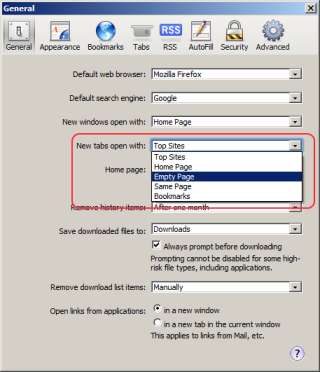
In Safari on Windows, select Preferences from the Edit menu. In the dialog box that opens, in the General tab set the value of the dropdown New tabs open with: to Empty page


After you make this setting, the thumbnail preview feature will be disabled when you start Chrome or Safari & when you open new tabs within them.

60
Read More
Posted in Browsers, HOWTO | No comments
Newer Posts Older Posts Home
Subscribe to: Posts (Atom)

Popular Posts

  • 10 ways to make laptop battery last longer
    Paraphrased from a Right Choice magazine article with my own opinions: Keep the brightness of the screen as low as possible. If portability ...
  • Words that leave Google Instant speechless
    2600 Magazine has compiled a list of objectionable words that Google Instant has blacklisted. Several volunteers have submitted blackliste...
  • A new JavaScript Reference to bookmark
    For years, the JavaScript section at W3Schools.com has been a indispensable source of reference for me . It will now not be my only source. ...
  • Free JavaScript & jQuery learning resources
    There is a nice compilation of JavaScript & jQuery learning resources in this community wiki on StackOverflow.com . I picked those which...
  • Manipulate PDF files for free with PDFRider
    PDFRider (currently in version 0.5) is an open source project on Codeplex. This utility provides a GUI for the command-line program  Pdftk ...
  • Look what Google Goggles visual search can do
    Google Goggles is a visual search application available currently for Android powered phones. It may possibly be available for phones of oth...
  • HOW TO read long text messages on the Samsung Omnia 652
    Samsung Omnia 652 clumps text messages from a single recepient together. Scrolling through a message doesn't reveal the entire message ...
  • Web Applications - Tips & Tricks
    Did you know, you can append +any-word to a GMail address & use that word to filter emails or distinctly identify where the mail has co...
  • What is the difference between Browser Mode & Document Mode in IE
    If you're a web developer and your job actively involves building web pages that work the same in all browsers including the last three ...
  • Dig deeper into jQuery with "jQuery Succinctly"
    jQuery Succinctly by Cody Lindley is an ebook that Syncfusion is offering as a free download (requires registration). I've been working ...

Categories

  • AJAX
  • Android
  • APIs
  • App
  • ASP
  • ASP.NET
  • ASP.NET-MVC
  • Azure
  • Azure SQL Database
  • AzureInPictures
  • Bing
  • Book Review
  • Bookmarklet
  • Browsers
  • C#
  • chart
  • Chrome
  • Cloud
  • CSS
  • CSS3
  • DidYouKnow
  • E-Commerce
  • Excel
  • FB
  • Fiddler
  • Firefox
  • Gadgets
  • GeoLocation
  • GMail
  • Google
  • Google Docs
  • Google Reader
  • Health
  • Hotmail
  • HOWTO
  • HTML
  • HTML/CSS
  • HTML5
  • Humor
  • Hyderabad
  • IE
  • IIS
  • India
  • Internet
  • IT
  • Javascript
  • jQuery
  • JSON
  • JSONP
  • Laptop
  • Learning Resources
  • Lists
  • Map
  • Metrics
  • Microsoft
  • miscellaneous
  • Mobile
  • NAPA
  • Office365
  • Opera
  • PDF
  • Performance
  • Personal
  • PHP
  • PM
  • PowerShell
  • Privacy
  • Programming
  • Rant
  • Safari
  • Science
  • Search Engines
  • SearchEngines
  • Security
  • SEO
  • Sharepoint
  • SharePoint2013
  • Silverlight
  • Software Engineering
  • Solutions
  • SQL Azure
  • SQL Server
  • TFS
  • Tip
  • Tips
  • Tools
  • Tools/Utilities
  • Trivia
  • TWIL
  • Twitter
  • UX
  • VM
  • VS.NET
  • VS2010
  • VS2012
  • WCF
  • WebApps
  • Websites
  • WF
  • Windows Phone
  • Windows7
  • Windows8
  • Word
  • WP7
  • WPF

Blog Archive

  • ▼  2013 (112)
    • ▼  October (16)
      • 10 ways to make laptop battery last longer
      • Learnings in S/W Engineering from the HealthCare.g...
      • TWIL - Week #29
      • MS currently has 21 apps on Google Play, incl. Wor...
      • Review: uCertify PMI PMP v-5 Online PrepKit
      • TWIL - Week #28
      • HOW TO highlight a Province within a Country with ...
      • My first impressions of Nexus 7 tablet
      • Free APIs, online services to generate screenshots...
      • TWIL - Week #27
      • HOW TO prevent mixed content warning in web pages
      • What's common between Kovid Goyal & Antony Lewis?
      • TWIL - Week #26
      • FB & Twitter spam me with similar subject line
      • Book Review: PMP Rapid Review by Sean Whitaker; MS...
      • Windows Azure Mobile Services - Error: Table 'some...
    • ►  September (14)
    • ►  August (8)
    • ►  July (8)
    • ►  June (13)
    • ►  May (12)
    • ►  April (12)
    • ►  March (8)
    • ►  February (15)
    • ►  January (6)
  • ►  2012 (127)
    • ►  December (11)
    • ►  November (14)
    • ►  October (13)
    • ►  September (14)
    • ►  August (16)
    • ►  July (16)
    • ►  June (6)
    • ►  May (5)
    • ►  April (11)
    • ►  March (12)
    • ►  February (7)
    • ►  January (2)
  • ►  2011 (98)
    • ►  December (5)
    • ►  November (2)
    • ►  October (5)
    • ►  September (7)
    • ►  August (7)
    • ►  July (15)
    • ►  June (10)
    • ►  May (7)
    • ►  April (8)
    • ►  March (10)
    • ►  February (11)
    • ►  January (11)
  • ►  2010 (163)
    • ►  December (14)
    • ►  November (19)
    • ►  October (19)
    • ►  September (15)
    • ►  August (18)
    • ►  July (17)
    • ►  June (20)
    • ►  May (17)
    • ►  April (19)
    • ►  March (5)
Powered by Blogger.

About Me

Unknown
View my complete profile